How This Blog Works
How This Blog Works
When I decided to add a blog section to my website, I needed a method that would preserve the minimalist structure of my main pages and keep the general architecture simple. Of course, I could have manually created separate HTML files for each post. However, this approach was burdensome in terms of content creation, lacked flexibility, and changing a single common element across all posts would require editing every page individually.
After researching practical methods for static sites, I didn’t want to use heavy and unnecessary static site generators like Jekyll or Hugo. Instead, as shown in the diagram below, I preferred to write a Bash script that automatically converts Markdown blog posts into HTML pages and adds them to the web directory and blog index.
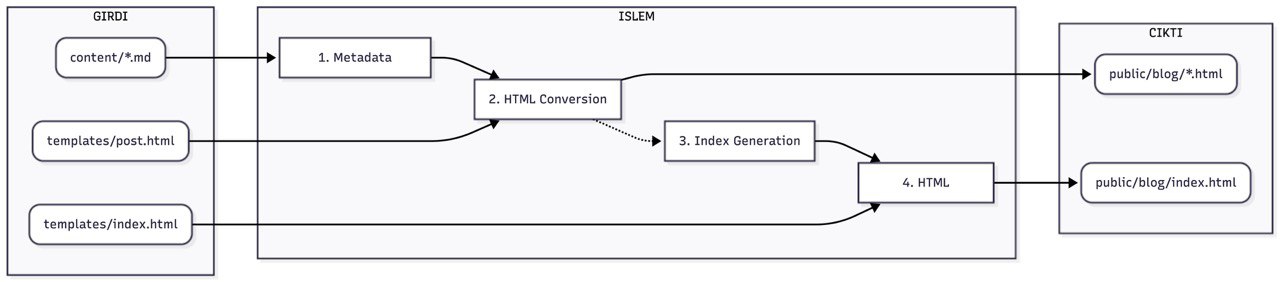
To make this script work, I structured my webpage’s directory as follows:
root
├── blog
│   ├── assets
│   │   └── buıldShFlow.jpg
│   ├── build.sh
│   ├── content
│   │   └── en-how-this-blog-works.md
│   └── templates
│       ├── index.html
│       └── post.html
├── CNAME
├── contact.html
├── css
│   └── style.css
├── index.html
├── public
│   └── blog
│       ├── en-how-this-blog-works.html
│       └── index.html
└── setup.html
Briefly, the script first parses the section containing the name, date, and language information found in the first lines of the Markdown file. (Since the sed command, which I use very frequently on Linux, did not work as expected on macOS, I had to perform this parsing process using a more traditional method with grep so that it could work on both macOS and Linux.) Afterward, I use the pandoc tool to generate an HTML file from the Markdown content based on the file information parsed earlier and the template files I created beforehand, which define the general structure of the blog page. This way, the file in Markdown format is converted to HTML format under the public directory and published.
files=("$CONTENT_DIR"/*.md)
if [ ${#files[@]} -eq  0 ]; then
echo  "Warning: There is no .md file in 'content' folder!"

else
    for  file  in  "${files[@]}"; do
        filename=$(basename  --  "$file")
        slug="${filename%.*}"

        title=$(grep  "^title:"  "$file"  |  sed  's/title: //g'  |  tr  -d  '"'  |  tr  -d  '\r')
        date=$(grep  "^date:"  "$file"  |  sed  's/date: //g'  |  tr  -d  '"'  |  tr  -d  '\r')
        lang=$(grep  "^lang:"  "$file"  |  sed  's/lang: //g'  |  tr  -d  '"'  |  tr  -d  '\r')
        if [ -z  "$lang" ]; then  lang="EN"; fi

        echo  " -> Converting: $slug"

        pandoc  "$file"  \
            -f  markdown  \
            -t  html  \
            --template="$TEMPLATE_POST"  \
            --highlight-style=tango  \
            -o  "$OUTPUT_DIR/$slug.html"

        echo  "$date|$lang|$title|$slug.html"  >>  "$TEMP_INDEX_DATA"
    done
fi
In the second stage, we need to add the created website to
the blog index list, i.e., the blog/index.html file
under the public directory. We use the HTML injection method for
this process. The script reads the index.html
template file I created earlier line by line and performs a
find-and-replace operation on areas marked with special keywords
within the template file.
   echo "Generating index page..."

posts_html=""

if [ -f "$TEMP_INDEX_DATA" ]; then
    sorted_posts=$(sort -r "$TEMP_INDEX_DATA")

    while IFS='|' read -r date lang title url; do
        posts_html+="<div class='grid-list'><div class='grid-label'>$date [$lang]</div><div><a href='$url'>$title</a></div></div>"
        posts_html+=$'\n'
    done <<< "$sorted_posts"
else
    posts_html="<p>No posts found yet.</p>"
fi

while IFS= read -r line; do
    if [[ "$line" == *"\$post_list\$"* ]]; then
        echo "$posts_html"
    else
        echo "$line"
    fi
done < "$TEMPLATE_INDEX" > "$OUTPUT_DIR/index.html"

rm -f "$TEMP_INDEX_DATA"

echo "Copying assets..."
mkdir -p "$OUTPUT_DIR/assets"
cp -r assets/* "$OUTPUT_DIR/assets/" 2>/dev/null || :

echo "Build complete! Check public/blog/index.html"
This allows us to benefit from the advantages of Markdown editing. Additionally, thanks to the template files, when we want to make a change that applies to all blog files, we can practically update everything by re-converting all pages according to the new template using the script.